


How to Apply for a SAQA Certificate of Evaluation with a GED

Completing the GED is an important milestone. However, the GED is a foreign qualification in South Africa because it is an American school leaving certificate. A graduate may therefore be asked to obtain a SAQA Certificate of Evaluation when applying for further study, employment, a learnership, professional registration or another opportunity requiring confirmation of the qualification’s South African level.
This guide explains what a SAQA evaluation means, what documents a GED graduate needs and how to complete the online application process.
Information checked in October 2026. SAQA’s portal, fees and document requirements may change. Always follow the instructions displayed in the current SAQA application portal.
What is a SAQA Certificate of Evaluation?
The South African Qualifications Authority—better known as SAQA—evaluates foreign qualifications through two connected processes:
Verification: SAQA checks whether the issuing body and qualification are recognized in the country of origin, whether the documents are authentic and whether the qualification was genuinely awarded to the applicant.
Comparison: SAQA compares the structure and outcomes of the foreign qualification with South African qualifications and determines where it is located within the South African National Qualifications Framework (NQF).
The outcome may be an electronic SAQA Certificate of Evaluation, also called an eSCoE, or an outcomes letter.
Why might a GED graduate need a SAQA Certificate of Evaluation?
A SAQA evaluation may be requested when applying for:
Further study at a South African college or tertiary institution
Employment where an NQF level must be confirmed
A learnership or training program
Professional registration
Immigration or work-permit purposes
Another opportunity requiring formal recognition of a foreign qualification
Not every institution requires a SAQA evaluation. Before paying the application fee, ask the receiving institution exactly what it requires and request confirmation in writing.
What a SAQA evaluation does not do
A SAQA Certificate of Evaluation confirms SAQA’s recognition decision and the qualification’s comparable location on the South African NQF.
It does not:
Convert the GED into a South African National Senior Certificate
Replace the official GED diploma or transcript
Guarantee admission to a university, college or course
Confirm that the learner has the subjects required for a specific programme
Automatically provide university matriculation exemption
SAQA evaluates the qualification. The university, college, employer or professional body still applies its own admission or appointment requirements.
This distinction is particularly important when planning for university. A SAQA evaluation and a university admission decision are not the same thing.
Before you apply
The graduate should have:
Passed all four official GED tests at an official GED external exam center
Received the official electronic GED diploma
Received the official GED transcript showing all four subjects and scores
A valid South African ID or passport
A personal email address and cellphone number
Access to one of the online payment methods offered in the SAQA portal
The international GED credential is formally called the District of Columbia High School Equivalency Diploma. Enter the title and awarding information exactly as they appear on the graduate’s official documents.
IMPORTANT: A GED Ready practice-test report, screenshot of marks or certificate issued by a preparation provider is not an official GED qualification document.

Step 1: Download the official GED documents
Sign in to the graduate’s official GED account and download:
The official electronic GED diploma
The complete official GED transcript


The transcript should show the results for:
Mathematical Reasoning
Reasoning Through Language Arts
Science
Social Studies
After the learner passes all four tests, GED Testing Service provides one free electronic diploma and one free electronic transcript. The download links are available for a limited period, so download the documents promptly and keep secure backup copies.
Do not crop, annotate or otherwise alter the secure electronic documents. GED electronic credentials include security features that help recipients verify their authenticity.
Should you need a copy of either your GED® transcript or the official GED diploma sent to someone, such as a university admission officer or SAQA, you can request this, at a minimal fee, through your official GED® profile on www.ged.com.
Step 2: Prepare the required documents
Prepare clear digital copies of:
The qualification holder’s valid ID or passport
The official GED diploma
The complete official GED transcript
The SAQA consent form, which will be downloaded from the application portal and hand-signed by the qualification holder
The portal may request additional information or supporting documents for a particular application. Follow the requirements displayed on the screen.
SAQA’s portal manual indicates that uploaded documents must not exceed 5 MB per file. The accepted file formats are displayed in the portal and may include PDF, JPEG, PNG, DOC and DOCX.
Check that:
Every document is complete and readable
All transcript pages are included
The files open correctly
The files are not password-protected
The personal details are consistent across the documents
Step 3: Open the SAQA application portal

New foreign-qualification applications are completed through SAQA’s Authentication Services portal. SAQA recommends using Google Chrome, including on Apple devices.
Go to the SAQA website and select:
Services → Evaluation of Foreign Qualifications → Apply for an Evaluation

Tick the box "I have read and understood the above notice and will comply with its content" and click the "Close" tab.
Step 4: Register the qualification holder’s profile

Select Register and create an individual profile.
The application must belong to the qualification holder. SAQA requires qualification holders to use their own unique contact details because it communicates directly with them about their applications and outcomes.
Enter the required:
Email address
Cellphone number
Username
Password
Personal details
Identity information
Residential address
Accept the terms and complete the email OTP verification. Then review and confirm the personal profile.
What if the GED graduate is a minor?
The portal includes an application route for a minor.
A parent or legal guardian may assist and select the minor option when prompted. The learner remains the qualification holder, while the parent or guardian provides the information required by the minor-application process.
Step 5: Create a new application

From the dashboard, select:
Create an Application or Create a New Application

Choose: Verification and NQF Level Comparison
Read the foreign-evaluation requirements and select Continue.
The portal allows applicants to save their progress and continue later. This is helpful if you need time to find a document or confirm a qualification detail.
Read the Foreign Evaluation Requirements and click Continue.

Step 6: Confirm the applicant’s details and purpose
Check the qualification holder’s pre-populated personal and contact details carefully.

Select the reason for the evaluation, such as:
Study
Work visa or permit
Immigration
Other
Accept the portal’s terms and consent statement, and then scroll down and select Add Qualification.

Step 7: Add the GED qualification
Enter the GED information exactly as it appears on the official diploma and transcript.

When the portal asks for the Qualification Details then fill in:
Country: United States of America
Issuing body: American Council on Education (ACE)
Qualification: High School Equivalency Credential (GED)
Year obtained
Certificate status
Certificate number, if applicable
The name and surname shown on the qualification
Make sure to select the United States of America as the country of origin.
Use the official credential title and issuing information shown on the GED documents. Do not enter the name of a GED preparation center or a learning center as the awarding body.
Step 8: Download and sign the consent form
Use the link provided inside the qualification section to download the SAQA consent form.
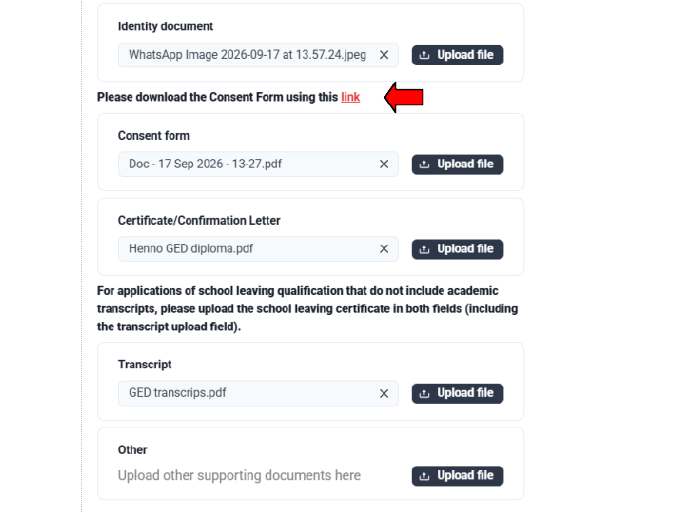
The qualification holder must:
Complete the form
Hand-sign it
Upload it in the Consent form field
This is separate from accepting the online terms and consent statement. Both steps may be required.
Step 9: Upload the supporting documents

Upload each document in the appropriate field:
Identity document: Valid ID or passport
Consent form: Completed and hand-signed SAQA consent form
Certificate/Confirmation Letter: Official GED diploma
Transcript: Complete official GED transcript
Other: Only where additional supporting information is required
Check each document before selecting Confirm.
GED Africa reports that SAQA can verify GED credentials internally through the GED system. Applicants should therefore not need to order separate third-party verification from the United States solely for a standard SAQA application.
However, SAQA may still request additional information or charge a separate third-party verification fee where this is required for an individual application.
Step 10: Review the pro forma invoice
After adding the qualification, continue to the Pro-forma Invoice stage.
The fee is calculated according to the number of qualifications submitted. SAQA’s tariffs can change, so do not rely on an old amount quoted in a blog post, infographic or social-media discussion.
Use the amount displayed in the current portal and consult SAQA’s current fee schedule.
Download or save the pro forma invoice for your records.
Step 11: Pay through the portal
Select Proceed to Payment or the equivalent current button to open the online payment gateway.

Use one of the payment methods displayed by the live payment gateway.
Although the September 2026 GED Africa guide says that payment can only be made by debit or credit card, SAQA’s own portal manual shows that its payment gateway may offer additional online payment methods. The safest approach is therefore to follow the options available in the live portal.
Do not make a manual cash deposit or ordinary EFT unless SAQA gives you specific instructions for a separate verification charge.
Save your payment confirmation and proof of payment. If the portal asks you to upload proof of payment, do so before completing the application.
Step 12: Complete the final submission
After payment, check the confirmation screen carefully. Remember to upload your POP (Proof of Payment) and to submit the application.
Select Done, Submit or the final confirmation button shown in the live portal.
Do not assume that uploading the documents or paying the fee automatically submitted the application.
Return to the dashboard and check that the application status shows Submitted.
Save:
The application or submission reference
The invoice
Proof of payment
Copies of all uploaded documents
The submission confirmation
All emails received from SAQA
Step 13: Monitor the application
Check both the SAQA portal and the qualification holder’s email regularly.
SAQA may request:
A clearer copy of a document
A missing page
Additional supporting information
Verification from the awarding body
Payment of a separate third-party verification fee
Respond promptly and include the application reference in all correspondence.
SAQA generally describes the processing period as approximately three months from the date on which a complete and compliant application is received and registered. Elsewhere on its website, SAQA refers to 90 working days for foreign-qualification evaluations.
Families should therefore plan for at least three months and allow additional time if external verification or further information is required.
The waiting period does not necessarily begin when an incomplete application is first started or submitted.
Step 14: Download the electronic outcome
SAQA will notify the applicant when the evaluation is complete.
Sign in to the same portal and download the electronic:
SAQA Certificate of Evaluation (eSCoE)
In some cases, the outcome may be communicated in an outcomes letter.
SAQA has issued electronic Certificates of Evaluation rather than routinely providing printed certificates since 1 July 2021.
The eSCoE includes digital security features and can be shared with a receiving institution. Save copies in more than one secure location.
Quick application checklist
Before submitting, confirm that the graduate has:
Passed all four official GED tests
Downloaded the official GED diploma
Downloaded the complete GED transcript
Prepared a clear ID or passport copy
Created the profile in the qualification holder’s name
Used the qualification holder’s unique contact details
Selected Verification and NQF Level Comparison
Entered the GED information exactly as shown on the official documents
Downloaded and completed the SAQA consent form
Hand-signed the consent form
Uploaded the ID, diploma, transcript and signed consent form
Checked that every file is readable and within the size limit
Reviewed and saved the pro forma invoice
Paid through the online portal
Uploaded proof of payment if requested
Completed the final submission step
Confirmed that the application status shows Submitted
Saved the application reference and supporting records
Confirmed the receiving institution’s requirements in writing
Helpful links
For foreign-qualification evaluation enquiries, SAQA lists:
Email: dfqeas@saqa.org.za
Telephone: +27 12 431 5000
Final reminder for parents
A SAQA Certificate of Evaluation can be an important part of using the GED in South Africa, but it is not a universal admission certificate.
Plan backwards from the learner’s intended destination. Contact the particular college, university, employer or training provider and ask for its requirements in writing.
The key questions are:
Does the institution accept the GED?
Does it require a SAQA Certificate of Evaluation?
Are there minimum GED scores?
Are specific school subjects required?
Is an additional bridging or access program needed?
Does the intended qualification have separate admission rules?
Keep the written response with the learner’s education-planning records. Clear confirmation before applying can prevent unnecessary expenses, incorrect assumptions and disappointment later.
Images credit:
Portal screenshots have been adapted by cropping from How to Apply for a SAQA Evaluation, prepared by GED Africa and dated September 2026. They are reproduced here with acknowledgement for educational guidance. Copyright remains with the original creator or rights holder. Portal screens, wording and payment options may change; applicants should always follow the current SAQA portal.
Disclaimer:
Information checked on 31 October 2026. SAQA procedures, tariffs and institutional admission requirements may change. Always consult the current official SAQA application portal and the receiving institution before applying.
This information is provided for general educational purposes and reflects the available SAQA and GED Africa guidance at the time of publication. SAQA procedures, fees, portal requirements and processing times may change. Each application is evaluated individually, and a SAQA Certificate of Evaluation is not guaranteed.
A SAQA evaluation does not convert the GED into a South African National Senior Certificate, grant matriculation exemption or guarantee admission, employment or professional registration. Families should confirm current requirements directly with SAQA and the relevant university, college, employer or professional body before applying.


Comments